
Manufacturing becomes difficult to control when production plans, material availability, shop-floor updates, and inventory records no longer align. Odoo Manufacturing connects these activities in one workflow, giving teams a clearer path from production demand to finished goods.
Key Takeaways
- Odoo Manufacturing is the production management application within the Odoo ERP suite.
- A Manufacturing Order connects the product, Bill of Materials, required quantities, components, and production status.
- Production can follow a simple one-step process or use Work Orders and Work Centers for multi-stage operations.
- Accurate products, BoMs, routings, lead times, and inventory rules are essential for reliable planning.
What Is Manufacturing in Odoo

Manufacturing in Odoo refers to the planning, execution, and recording of production activities within the Odoo ERP environment. Its core application, commonly known as Odoo Manufacturing or Odoo MRP, uses Bills of Materials, Manufacturing Orders, Work Orders, Work Centers, and inventory movements to manage how components are converted into finished goods.
Is Odoo a manufacturing software? Yes. Rather than operating as an isolated production tool, it forms part of the wider Odoo ERP environment. Businesses can use the module for simple assembly or configure multi-operation production based on their products, processes, and control requirements.
How Does the Odoo Manufacturing Workflow Work?
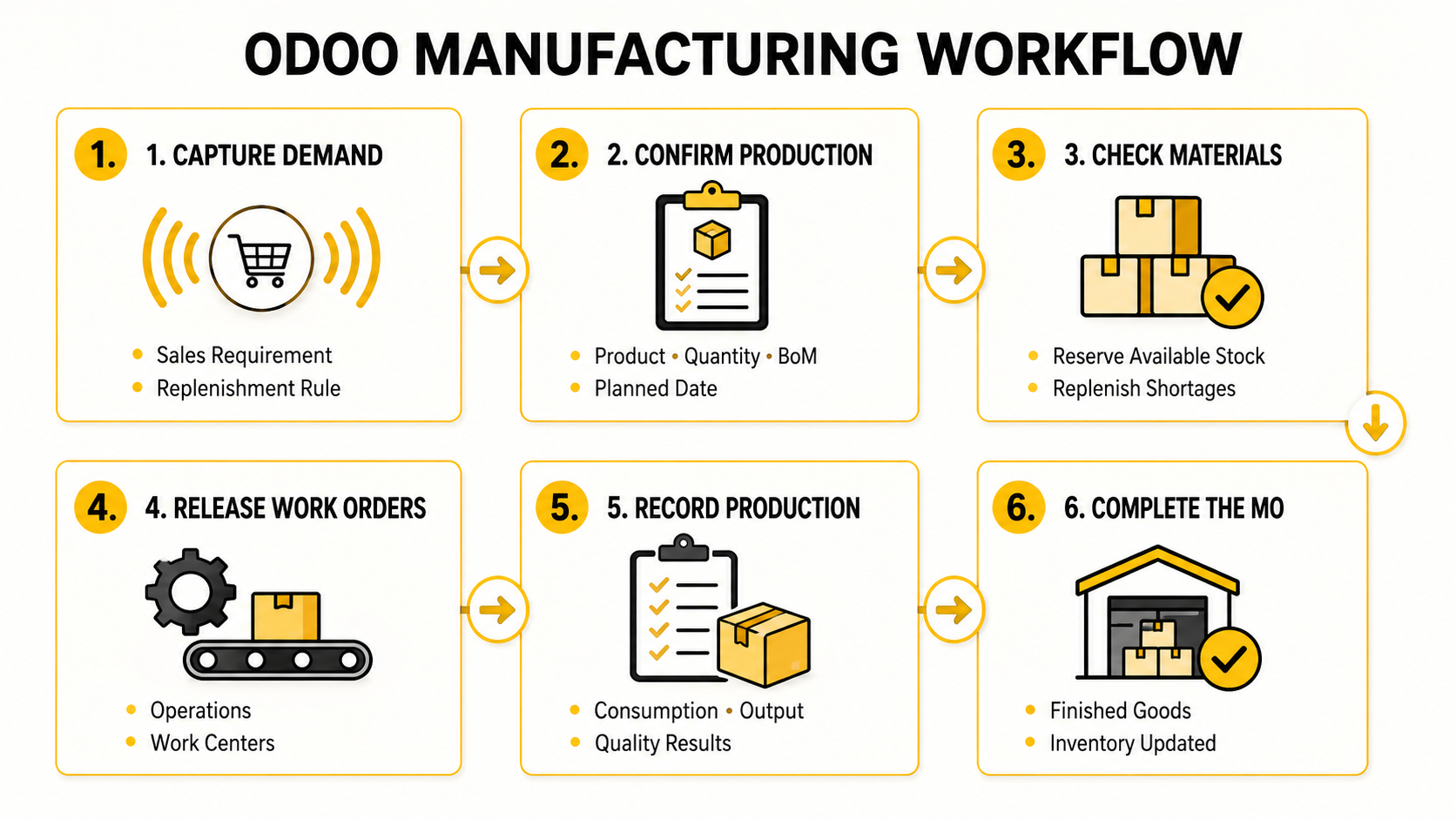
The Odoo manufacturing workflow begins with production demand and ends when the finished product and its related stock records are completed.
- Capture production demand: A Manufacturing Order can be created manually or generated from demand, such as a sales requirement or replenishment rule.
- Confirm the production specification: The Manufacturing Order identifies the product, quantity, Bill of Materials, required components, and planned completion date.
- Check material availability: Odoo checks whether the required components are available. Existing materials can be reserved, while shortages can trigger the appropriate replenishment process.
- Release production work: For multi-stage production, the Manufacturing Order creates Work Orders and assigns operations to the relevant Work Centers. Simpler production can be recorded directly from the Manufacturing Order.
- Record production activity: As work progresses, the production team records component consumption, completed quantities, operation status, and any required quality results.
- Complete the Manufacturing Order: Once production is finished, the components are consumed, finished goods are added to inventory, and the related stock movements and production records are updated.
Depending on the warehouse configuration, this flow can run as a direct one-step process or include separate component-picking and finished-goods storage stages.
Core Odoo Manufacturing Module Features
Once the production flow is defined, the Odoo manufacturing module provides the operational structure needed to plan materials, organize work, record output, and control production data. Each capability supports a specific stage without separating shop-floor activity from the wider ERP environment.
Bills of Materials, Routings, and Work Centers
A Bill of Materials (BoM) defines the components and quantities required to manufacture a product. Odoo supports multi-level BoMs for subassemblies, along with product variants, by-products, and kit BoMs for unassembled component sets.
Operations attached to a BoM form the production routing. Each operation can be assigned to a Work Center with its own schedule, capacity, expected duration, and operating cost. This structure establishes what must be consumed, where each task takes place, and in which sequence production should proceed.
Please read more: Top BOM Management Software in Malaysia for Manufacturers
Material Requirements Planning and Master Production Schedule
Odoo MRP combines product demand, forecasted inventory, BoM requirements, replenishment rules, and lead times to identify what must be manufactured or purchased. Component availability can be checked against planned Manufacturing Orders before production begins.
The Master Production Schedule (MPS) supports longer-term replenishment planning against a demand forecast that planners can review and adjust. Make-to-order and make-to-stock strategies can be configured according to how each product should be supplied, while scheduling views help coordinate Manufacturing Orders with available Work Center capacity.

Shop Floor Control and IoT Integration
The Shop Floor interface presents Work Orders by Work Center, giving operators direct access to the tasks assigned to their production area. From a tablet or terminal, they can view instructions, start or complete operations, record working time, report quantities, and register component consumption or scrap.

Compatible barcode scanners, label printers, measurement tools, and other connected devices can exchange data with Odoo through an IoT setup. The available automation depends on the device, connection method, and production configuration.
Quality Control and Lot/Serial Traceability
Quality Control Points can generate checks at selected stages, including material receipt, production operations, and final completion. These checks may require instructions, pass-or-fail confirmation, measurements, or photographic evidence. Failed checks can be linked to a Quality Alert for investigation and follow-up.

Lot and serial tracking connects consumed components with their Manufacturing Order and finished products. This record allows teams to trace materials back to a supplier or forward to the relevant stock movement and customer delivery.
Product Lifecycle Management and Engineering Changes
Odoo PLM manages product and production changes through Engineering Change Orders (ECOs). Each ECO can follow defined stages and approval rules before updates are applied to the relevant BoM or operation.

Version history preserves the relationship between proposed changes, approved production data, and supporting documents such as technical drawings, specifications, or work instructions. This keeps engineering changes controlled without replacing active production data before approval.
Preventive and Corrective Maintenance
The Maintenance application organizes equipment records, maintenance teams, requests, and planned service activities. Corrective requests can be created when a machine fails or shows a problem, while preventive maintenance can be scheduled before the next expected service date.
Equipment can be associated with specific Work Centers, keeping maintenance activity connected with the production resources it affects. Metrics such as Mean Time Between Failures (MTBF) and Mean Time to Repair (MTTR) provide a consistent record of equipment reliability and repair duration.
Subcontracting, Scrap, and Unbuild Orders
Odoo supports subcontracted production by connecting subcontracted products, supplied components, Purchase Orders, subcontractor locations, and finished-product receipts. Components may be sent to the subcontractor by the manufacturer or sourced under the agreed supply arrangement.
Scrap Orders record materials or products removed from usable inventory during production. Unbuild Orders perform the opposite movement of manufacturing by disassembling a finished item and returning recoverable components to the appropriate inventory locations. These transactions preserve stock records when production does not follow the standard completion path.
Production Reporting, OEE, and Cost Analysis
Production reporting consolidates Manufacturing Order status, completed quantities, operation durations, and Work Center performance. OEE shows how much of a Work Center’s available time is fully productive and helps teams review the causes of lost production time.
Odoo can also calculate expected and actual production costs using component consumption, operation time, and Work Center cost rates. Comparing planned and actual values by Manufacturing Order helps reveal cost differences caused by material usage, longer operation times, scrap, or rework. The accuracy of these reports depends on consistent shop-floor recording and cost configuration.
How Odoo Manufacturing Integrates with Other Odoo Apps
Odoo Manufacturing connects production transactions with the commercial, supply chain, and financial processes managed in other Odoo applications.
Odoo application | Connection with Manufacturing |
Sales Orders can create product demand that triggers manufacturing when the appropriate supply route is configured. | |
Component shortages can generate procurement requirements, while component shortages can generate procurement requirements, while Purchase Orders support subcontracted products and related material flows. | |
Stock quantities determine component availability. Reservations, consumption, scrap, finished goods, lots, and serial numbers are recorded through linked stock movements. | |
Material valuation and production cost data can flow into financial records according to the company’s inventory valuation and accounting configuration. |
This integration keeps each department working with the same products, quantities, document references, and transaction status while preserving the responsibilities of each application.
Is Odoo Manufacturing Right for Your Business?
A broad feature list does not determine whether an ERP will work on the factory floor. The fit depends on production complexity, data quality, integration requirements, internal ownership, and how consistently each team will use the system.
Key Benefits of Odoo Manufacturing
Odoo Manufacturing can deliver several operational advantages when its configuration reflects the actual production process:
- Better production visibility: Planners can monitor order status, material availability, component consumption, and completed quantities from current operational records.
- Less manual coordination: Automated routes and replenishment rules reduce repeated data entry between business functions.
- Earlier issue detection: Quality checks, traceability records, and maintenance requests capture problems closer to where they occur.
- More reliable costing: Recorded material usage and operation time support comparisons between expected and actual manufacturing costs.
- More consistent execution: Work Orders and production instructions give operators a defined process for recording daily production.
These outcomes depend on reliable data and consistent transaction recording.
When Odoo Manufacturing Is a Strong Fit
Odoo Manufacturing is a strong fit for businesses that:
- Rely on spreadsheets or disconnected production applications.
- Want production to operate within a broader ERP environment.
- Expect their product range, production volume, or operating structure to grow.
- Are prepared to standardize production processes and master data.
- Can assign clear owners for products, BoMs, routings, and inventory rules.
What Businesses Should Consider
Before adopting Odoo for manufacturing, businesses should assess four areas:
- Data readiness: Products, BoMs, routings, units of measure, and lead times must be sufficiently accurate for planning.
- Process complexity: Specialized scheduling, process control, or shop-floor requirements may need additional configuration.
- Customization and integration scope: Each requirement should have a defined business purpose, data owner, and technical boundary.
- User ownership: Planners, operators, warehouse teams, quality users, and finance must understand their responsibilities in the new workflow.
These factors determine the implementation scope and should be assessed before solution design begins.
Odoo Manufacturing Implementation Roadmap
A controlled implementation begins with one defined production flow and expands only after its data, transactions, and reporting remain stable. The following roadmap keeps the rollout aligned with operational priorities.
1. Define Business Goals, Scope, and KPIs
Start by identifying the production outcome the project must improve. Relevant KPIs may include on-time delivery, production lead time, Work in Progress visibility, inventory accuracy, scrap rate, schedule adherence, or manufacturing cost variance.
Next, define the first implementation scope:
- Production site or Work Center.
- Product family.
- Make-to-order or make-to-stock flow.
- Odoo applications included.
- Users and business roles.
- Required reports and integrations.
Phase-one acceptance criteria should describe observable results, such as accurate material reservations, completed Work Orders, finished-goods receipts, and production costs that finance can reconcile.
2. Map Processes and Prepare Manufacturing Data
Map the normal production flow from demand and material reservation to Work Order completion and finished-goods receipt. Define the roles, approvals, and records required at each stage before configuring the system.
Prepare the master data required by that flow:
- Products and units of measure.
- Bills of Materials and approved versions.
- Operations, routings, and Work Centers.
- Setup time, cycle time, capacity, and cost rates.
- Supplier and production lead times.
- Inventory locations and replenishment rules.
- Lot or serial number policies.
Each data set should have an assigned owner responsible for validation and future updates.
3. Configure the Pilot and Essential Integrations
Configure one representative production flow before expanding across the factory. The pilot should include a real product, BoM, routing, Manufacturing Order, material movement, and finished-goods receipt.
Connect only the applications and external systems required to complete the pilot. For each integration, define the source record, destination, synchronization rule, and responsible owner before adding non-essential connections. External MES, CAD, forecasting, or automation integrations can follow when they are not essential to the pilot.
The objective is to validate the operating model with limited scope, not to activate every available feature.
4. Test End-to-End and Exception Scenarios
Test the standard Manufacturing Order flow together with common exceptions:
- Material shortages, partial availability, and substitutions.
- Partial completion, scrap, and rework.
- Failed quality checks.
- Equipment downtime, cancellation, and rescheduling.
- Inventory or subcontracting discrepancies.
User Acceptance Testing should verify stock movements, traceability, operation status, finished quantities, and cost results. Each issue should be classified as a data, process, configuration, training, or integration problem.
5. Train Users, Go Live, and Continuously Improve
Provide role-based training for planners, warehouse teams, operators, quality users, and finance rather than giving every user the same general session. Each group should practise the transactions and exceptions they will manage after go-live.
Go live with the validated pilot scope and maintain a defined stabilization period. Resolve recurring data, process, configuration, and adoption issues before expanding to additional products, Work Centers, or sites. Further modules and integrations should be introduced only after the core manufacturing flow remains reliable.
Odoo Manufacturing Demo and Documentation
An effective Odoo Manufacturing demo should follow a realistic product through the production cycle rather than present isolated menus. Businesses should prepare a sample BoM, routing, Work Center, inventory position, and common production exception before the session.
A tailored demo should show how Odoo can:
- Create and process a Manufacturing Order from real demand.
- Handle an exception such as a material shortage, partial completion, or failed quality check.
- Review traceability, inventory movements, and actual production costs.
The Odoo Manufacturing documentation covers standard configuration and user operations, while a tailored demo shows how these functions apply to a specific production flow.
Businesses can request a tailored Odoo Manufacturing demo from A1 Consulting using one of their own production scenarios.
Frequently Asked Questions
Which ERP Is Best for Manufacturing?
There is no single ERP that is best for every manufacturer. The right choice depends on production complexity, planning, traceability, costing, shop-floor requirements, integration scope, and available implementation resources.
Odoo is a strong candidate for businesses seeking a modular ERP that connects production with wider commercial, supply chain, and financial processes. Highly specialized machine control or constraint-based scheduling may require additional applications or external systems.
How Long Does an Odoo Manufacturing Implementation Take?
A focused Odoo Manufacturing pilot may take several months, while a multi-site rollout usually requires a longer phased program. The timeline depends on process complexity, data readiness, customization, integrations, user availability, and rollout scope. A reliable estimate should therefore follow an initial process and data assessment.
Can Odoo Manufacturing Support Multiple Factories and Warehouses?
Yes. With the appropriate Odoo subscription and configuration, businesses can manage multiple companies, warehouses, production locations, and Work Centers within a connected environment.. Manufacturing Orders, material transfers, replenishment routes, and finished-goods movements can be configured for each operating site.
The design must define which company owns the inventory, where materials are stored, how products move between locations, and which users can access each record. Intercompany transactions, local accounting requirements, and shared master data should be assessed separately during solution design.
Can Odoo Manufacturing Integrate with Existing Business Systems?
Yes. Odoo Manufacturing can connect with MES, CAD, warehouse automation, eCommerce, logistics, and reporting systems through supported APIs, connectors, middleware, file exchange, or custom integrations. Available integration methods depend on the Odoo subscription and technical environment.
Each integration should define data ownership, identifiers, synchronization, validation, error handling, and security before development begins.
What Is the Difference Between Odoo Manufacturing and a Standalone MES?
Odoo Manufacturing is part of an ERP platform. It connects production planning and execution with inventory, purchasing, sales, quality, maintenance, and accounting. It includes Manufacturing Orders, Work Orders, Shop Floor operations, Work Centers, and production reporting.
A standalone Manufacturing Execution System (MES) usually focuses more deeply on machine-level control, high-frequency production data, equipment signals, process parameters, and integration with PLC or SCADA environments.
The two systems are not always alternatives. Odoo can manage ERP-level planning and business transactions while a specialized MES controls detailed shop-floor execution, with agreed data exchanged between them.
Conclusion
Odoo Manufacturing provides a connected structure for planning, executing, and tracking production within the wider Odoo ERP environment. Its value depends on how well the system reflects actual processes, production data, and user responsibilities.
A1 Consulting can help assess your requirements, configure the right manufacturing workflow, and support a phased rollout from pilot to go-live. Contact our team to discuss your production environment or request a tailored demo.

Sally N.
BDM - Partner and Alliance
With over 7 years of experience in ERP advisory, Sally has worked closely with SMEs across Malaysia to streamline operations and drive digital transformation. Her deep understanding of business processes and hands-on approach have made her a trusted advisor to many growing companies. Through this blog post, Sally aims to share practical insights and real-world lessons drawn from her implementation experience, offering guidance to businesses navigating their own ERP journey.